Trusted by 17,000+ founders

Rated 5 out of 5
Paul
Founder
Video transcript: Hi, my name is Paul, I'm from the UK and I run a small photography business. My biggest productivity bottleneck is the fact that I have ADHD quite severely. In fact, I have all of these ideas coming into my head and they disappear as soon as they've come in. So I needed a system that, where I could just speak my reminders or I could speak what ideas I had. And I found that Apple, the native Apple products, didn't really suit that because by the time I'd unlocked my phone or asked Siri to do something, I'd already forgotten what it is I wanted to do. Whereas we've noticed I've got it set up on my action button, I can just send it a message saying, remind me at six o' clock to send an invoice. And it does. I've been a bit lax with notice recently because I, with most people with adhd, I really hyper focused on it in the first month or two of being subscribed and I just got ridiculously overwhelmed. Still, I'm now to a certain degree, however, I've just logged back in after a short time away and I've noticed there's some really great features come, come to the. To the ecosystem. So I'm really excited to give that a try. Within my business, my biggest issue is accepting new jobs and getting them booked in. So I'm just in the process of getting notice to basically monitor my emails so that when I get a new job request come in, it will automatically log into my system that I use to gather all my jobs and then automatically accept the job and then send the customer a text message saying, please follow this link to book in your photography appointment, which is just fantastic. If I can get that up and running, it will be incredible. So, yeah, I'm really pleased. I mean, some of the basic things I'm doing with it at the moment is I've got it monitoring my inbox. So if I get an email from a customer inquiring about a job, it will send an email straight back to them with a link to book their service. And it's just really exciting. It's a really great product, even for like basic AI sort of chats about what's on cinema tonight. I can just simply press the action button on my iPhone and say what's on at the ODN in Northampton tonight? And it will come back within two or three minutes. It will come back with a full list of what's happening. It's really good and I'm so excited to see where it can take me and my business in the future.

Rated 5 out of 5
Pablo Diez
Chief Golf Officer
Video transcript: Llevo unos cuantos meses usando Notis y la verdad es que es de las primeras veces que siento que realmente la inteligencia artificial me está ayudando en paralelo a mi trabajo. Es tal cual en el WhatsApp, es una herramienta que muchas de las cosas que se iban a mi lista de cosas por hacer, esos pendientes en el to do list, muchas veces con solamente mandárselos a Notis se resuelven lejos de estarlos acomodando para después atenderlos. Y por otro lado, el superpoder de hacerlo a través de una nota de voz me parece maravilloso. Es tal cual tener a alguien en tu equipo que le avientas tu idea y te ayuda a acomodarlo. Muchas de las ideas que suelo tener las mando en notas de voz que luego muchas veces se quedan ahí guardadas desde que grabo la nota de voz directamente en el WhatsApp de Notis. Esto tiene un orden, se acomoda y está volviéndose cosas de la realidad. Recomiendo ampliamente anotis para toda la gente que está buscando alguien que lo ayude, un asistente, un compañero de equipo que trabaja en paralelo. Otra cosa que me acomoda mucho de Notis es que todas las mañanas me manda un resumen de mi día, cuál va a ser el clima, qué tengo que hacer y esto ayuda para darte una idea de cómo va a empezar el día y qué es lo que tienes que hacer.

Benjamin Charbit
COO of Mobile Club

Feb 6, 2026

Rated 5 out of 5
Victor Cui
Global sports business entrepreneur
Video transcript: Hi, my name is Victor. I'm a global entrepreneur in sports business, and that means I'm traveling all around the world. And notice has been an absolute game changer for me. It allows me to integrate into notion and use WhatsApp in a way that I'm very used to being able to send a message, look for content, put all of my stuff, and have it all at my fingertips just by talking and sending a message. Absolutely incredible. I love it. I highly recommend it to everyone.

Rated 5 out of 5
Dom
CEO
Video transcript: I've been using Notice now for about three or four months and I'm finding it fantastic. As a field agent, I'm often on the road and in particular I'm at a convention. As you can see, I'm at 1 right now and I need to often capture details of potential customers, including their marketing consents. When I'm doing this on the fly, it's like texting a friend. I just text via WhatsApp and my Novus database is updated. Total game changer for me. I'm then able to use Novus's built in technology to craft a campaign. According to who wanted to be contacted about what.

Rated 5 out of 5
Benjamin
Entrepreneur
Video transcript: My name is Ben and I've been using Notice for a month now and it's completely changed my workflow and it's for a person that has never used Notion at all in the past. It was actually the one of the easiest ways to learn how to use it in general. So Notice helped me build out my databases. It also helped me to create templates and to auto tag things and to auto organize things. So from that aspect alone, the just being able to do all of those things without me trying to build out the perfect system, which is what I normally do, it's helped me to just start using it immediately and so I use it for more of a project and task management. But now after this first month of using it, it'll be a lot easier for me to do different types of workflows and as my use cases change, it's pretty flexible in terms of the automations and I'm able to call as well, which is extremely helpful. So I'm able to talk through my day and able to reflect and to kind of see what I need to work on next. And so from that aspect alone, it's been extremely powerful and it's being updated all the time. So I'm really excited to continue using it, especially as I build my business as well.

Ben
Budding entrepreneur/ Masters of Entrepreneurship student
Rated 5 out of 5
Dec 23, 2025

Rated 4 out of 5
Juan Carlos Bernadac
Architect
Video transcript: Hola, ¿Cómo están? Yo soy Juan Carlos Bernadac, soy arquitecto, tengo 39 años y tengo notis, manejo notis desde hace aproximadamente unos tres meses. En mi profesión lo uso diario, sobre todo me permite trabajar mientras estoy en campo sin tener que llegar a la computadora. Me ahorra aproximadamente de una hora a dos horas diarias, simplemente mando mensaje de voz, una nota a WhatsApp y se encarga de hacer reportes, notas, hago muchas notas para compras, listas de compra, insumos y bitácora de obra diaria. Entonces me ha funcionado muy bien, la verdad es que es un producto muy bueno que les recomiendo y bueno, vamos a sacarle más provecho. Gracias.

Rated 5 out of 5
Nick Kovac
President
Video transcript: Hi, my name is Nick Kovac. I am a creator based in Tokyo, Japan. My biggest pain point before using Notice was how to access the AI features within Notion. Especially on my mobile device. It was not only difficult to access, it was very slow and the feature set wasn't there. I found immediately using Telegram that I could communicate with Notice in a very regular way communicate with my notice databases. I started to create Content Calendar. I used the recommended content calendar from Notice in my day to day activities creating weather related posts on Tokyo that involved making weather cards for the day, you know, if it's sunny, if it's cloudy with the weather and that worked very well. I could make a prompt, a regular prompt for notice and get a very consistent look and feel. I received great support from Flow. I did have some problems initially. I also reported problems to Notice regarding video and video solution not working well and it did take some time but those problems were solved and I'm noticing now that the video is being produced consistently. Text is being put on those slides in Japanese correctly, you know. So I'm very excited that there's been improvements over time with the solution and I look forward to looking. Look forward to using it more in the future. I did request some items to Flo and the support was great. I really appreciate his personal touch there. My favorite feature I think still is that you are using Notices is using the Telegram to talk with my mobile device and I find that's a very natural way, an interface that I'm very used to a natural way to communicate with the Notice system and of course my my databases inside of Notion. Keep up the good work.



Rated 5 out of 5
Damon Flowers
Founder
Video transcript: Hey, this is Damon and I want to talk about Notice for a moment and how effective it has been in my own personal life and also in our business. For us, we run a growing business and that business requires a lot of moving parts and so a lot of ideas, but not a lot of capability in the in the beginning to execute on those ideas. And so notice has enabled me personally to be able to process my thoughts when I come across information, file it in the right place inside of notion ideas for newsletters, customer feedback, prospect feedback, anything that I'm picking up and hearing out in the world. I can very easily now call on Notice to translate that information back into the appropriate database and system inside a notion so that I can access it later. Flow's also been great in helping me to understand how to build instructions and how to teach notice and AI to be more effective for what I wanted to do as well. We heavily rely on the automations using triggers and webhooks inside of Notice to run a whole vast series of events every single week in our business. Little bit tricky understanding, kind of getting things going in the beginning but Notice but Flow has been absolutely fantastic at helping us and making sure that streamlining if we run into any bugs or challenges, he's right there to to help see it through, we'd highly recommend not. It's been great for us as well.
Rated 5 out of 5
Owner/Engineer/Producer
Video transcript: Hi, my name is Josh Holland of Greenlight Studios. I've been using notice for a couple of months now, and it has intensely changed the way that my life goes. So I can do everything from using the system that it comes with, which is super effective already. But I've also done to where I've built systems of. For example, I have a mixNote database. So if I go on a jog and I'm listening to a song and I'm like, hey, I've got an idea, I can literally pull it out, leave it a message for a mix note, and then when I come back to be able to adjust it, I. I just have to ask for that mix note again. And it gives me a detailed thing. I can have three or four of them while I'm on that same jog and pull them all up and be ready to go. I can also take the client work that I work on and say, we just got done with a mix and we're getting ready to move it to mastering. I can do it all by voice now. So I have a lot of places that this has immensely helped my life and I will continue using it and growing with it. If your brain is constantly full of ideas and you need a trusted place to put it, Notis is a great way to do it because you just connect it to notion and then from there you, you're good to go. You have a database collected of all of your thoughts that you can be able to go back to and ask about at any time.

Michael Khan Armstrong

Rated 5 out of 5
Jul 11, 2025
Rated 5 out of 5
Michael Armstrong
Founder
Video transcript: I first started using Notice for a really, really simple use case. I just wanted to be able to record voice notes of myself talking and have it saved into my Notion databases. And I was doing this with the built in Notion AI for a while, but then my minutes of it ran out and they're trying to upsell me to their, their paid AI and the AI wasn't that great for a lot of other things that they're doing. And I found out about Notice and I was like, okay, this is great. And I had tried to build a no code version of this before where, where I could use a telegram bot and send a voice note and have it get saved into Notion. Great. Very, very simple. And then I started to learn about what Notice is and what it can do and seeing this more detailed nuance of what this tool actually is. And I was just completely blown away by it. And more than, it's more than just a feature or a use case or some specific thing that I'm doing with it. What I've really realized, and as somebody, I'm a Notion power user, so I've been using it very intensely many years. I've done a lot of training on how to set up Notion and it's so powerful. But it's really this like vast garden that's just a blank canvas. And you have to do a lot of garden tending. You have to really be conscientious of how you're setting everything up and how you're tending your system. It's like, okay, the, the vegetable beds go over here and the fruit trees go over here and we've got to build the irrigation and you've got to set up all that infrastructure for yourself. Which is what, why Notion has a kind of steep learning curve versus some of these other productivity tools, but which gives it this flexibility and power to be very, very customized in what you're doing. And what I've realized about using Notice is that it's really like the tool becoming the gardener for you. So rather than being like, okay, my garden is producing fruit and I can harvest it, but then I have to go and pick all the cucumbers and I have to go change the irrigation lines. When this changes, you can just say to notice, you go, shift this, take that, harvest this for me and do the whole thing over telegram or WhatsApp or whatever voice message service you're using. And it feels like this kind of fundamental shift. It's like a sea change shift in how we relate to technology that is now possible only because of AI. Because AI is this mediating bridge between things. It's this new way of working that is eliminating this complicated UI and all this structure and just making things really, really simple in the, in the front end experience. But then this vast magic is happening in the back end that really allows you to do anything. And I've really come to this place where it's hyper accelerated my productivity, where I'm spending so much less time typing and on the phone and just driving through the voice notes. But it also just feels like there's just this vast untapped potential of what we can do with our technology. And notice feels like this threshold jump and how we do that.
Rated 5 out of 5
Andrea Ercolessi
Founder
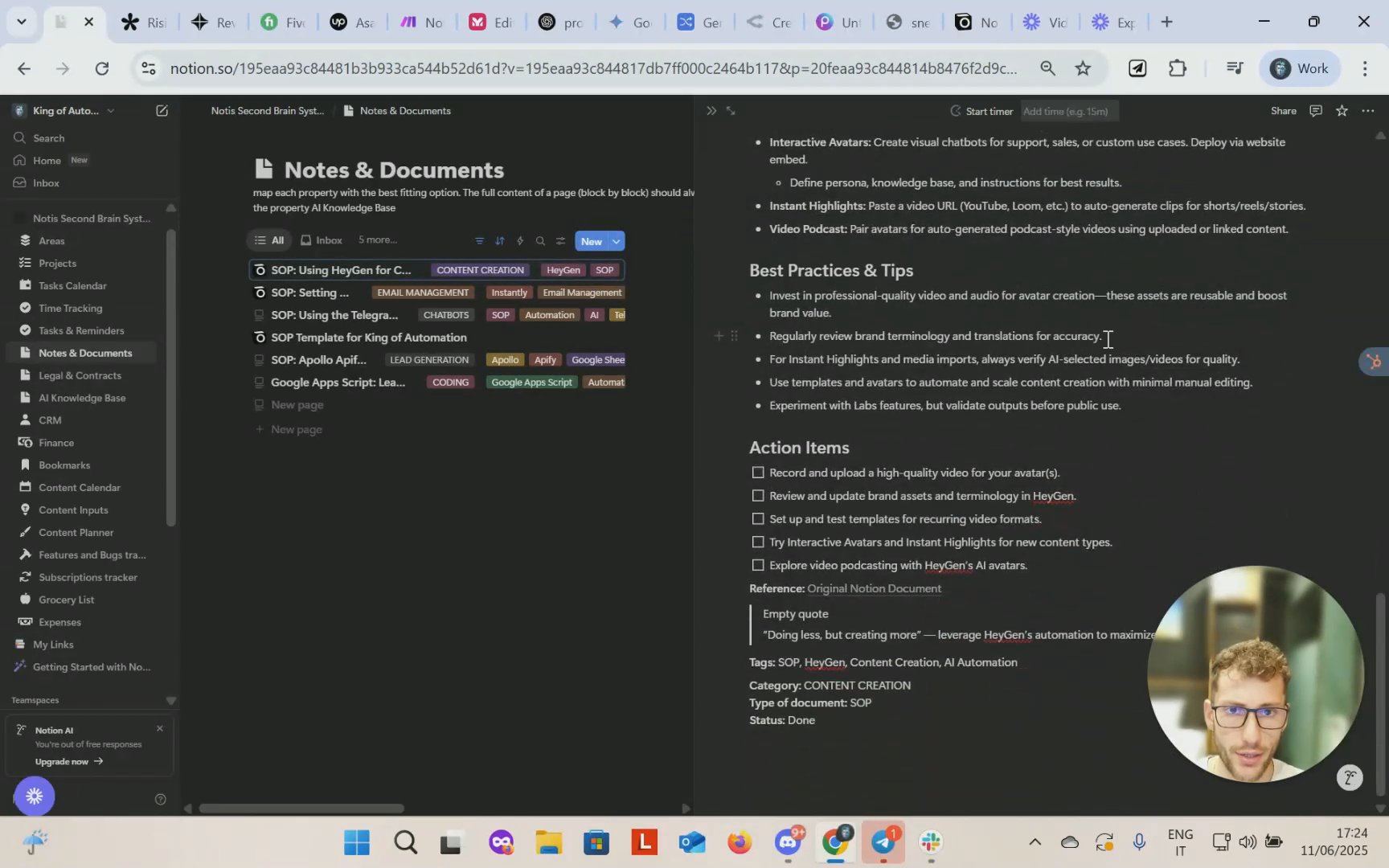
Video transcript: Hey everyone, it's Andrea here from King of Automation. And today I want to talk about AI agents and the way that they can completely change how you interact with Notion. For those of you that are familiar with Notion, it's a platform that's fully customizable and that can usually work as a second brain system for your personal life, your business or both. And if you are familiar with Notion, then you definitely at some point in your life got to see how hard it is to set Notion up as a beginner, especially whenever you just got started. There's trade off that comes with customization features, which is ease of adoption. This is a problem that's common to everyone. And lately Notion came up with Notion AI to help user get acquainted with the interface and build the database and systems more efficiently and with less headaches. Nonetheless, there's a very active community using Notion. I feel like most users would just love to get started as quickly as possible since they'll be using Notion to make their business more efficient or the life more efficient and they definitely do not want to waste time figuring out how things work. The problem about Notion AI, which is the native AI that Notion is offering, beside the fact that it's a bit pricey, I think it's $24 per month, something like that, it doesn't really do much. It can generate databases, but it's a one shot prompt thing. So if you basically do not get the prompt right and your database is not looking exactly the way that you was expecting, you have to start over. You cannot make edit edits around the way. It can retrieve knowledge, but it's slow, it's, it's not really ideal. I recommend you to try and use it and you will see by yourself what I'm talking about. So just as me and many other people, we've been trying to figure out a way to overcome this issue. And clearly it's not an option to just ask Notion to, you know, improve their AI. They have their own roadmap and they probably don't care. So during like my researches I came up and figured out there was an existing or, well, an almost existing solution back at the time, which now is real, it's an actual product, which is Nodis AI. And I met with the founder Flo a month ago when the product was in beta and I had the chance to partner in the development of this product with him by providing iterative feedback and real case studies in which Notice could have shined as a product integrated directly with Notion. So what is Notice? Notice is an AI agent that directly integrates with Notion and has a bunch of functionalities multimodal capabilities. We can see some of them here. Transcription automatic sync, image supports multilingual. It can write documents, it can find answers anywhere they are. As long as there's data inside your notion then notice will find it and you can automate task. Just think of any agent that you can conversate with in your language that supports WhatsApp Telegram as an interface. So you don't need to adopt any kind of difficult backend. No, you just simply send text vocal and it will follow up with actions inside Notion. It's almost like a personal or business assistant depending on the use case that you want to deploy it for. I personally use it for both and it's absolutely great. So when I met with Flow, we both knew that this product was going to be extremely useful because in first place we were looking for a solution that was not available on the market. Notion AI was not really providing the kind of of customization and functionalities that would have could be considered helpful for, you know, having a second brain system that can be worth of being called such. And he asked me to find real case, real case studies about this product and how we can make it useful for other businesses regardless of their the industry that they are in. And I came up with a few ideas that I'm going to show you next that I'm also deploying for my own company. Before that, if you're wondering how to access notice, I will put the link in bio here on the bottom of the video and you can see above here. There we go. Right now it's running for a monthly plan, but there is still yearly plan discount. So if I was you, I would take advantage of this while it's lasting because for the price that this is going for, it's an absolute steal. But let's jump right into it. I want you to judge by yourself what are the capabilities of this product. Have you ever struggled to find a reliable way to track the time you spend on working without disrupting your workflow? If the answer is yes, then I might have the solution for you. I've been looking for multiple ways to do this and I couldn't just find a tool that was matching my expectation and having all the features I needed, especially because it required me too much manual input and that was just getting my focus away from work. And first of all, why would you do this? This is because you want to be accountable for what you put your working hours on. Are they really moving the needles Are they really bringing ROI to your business? Or maybe you want to track your employees or your contractors hours for billing. There's a multitude of reasons why you would like to track working hours. In my personal case, I do it for my because I like to be aware of where I'm spending my hours and how am I locating the time slots during my day so that I can review it on a weekly basis and try to improve my productivity. So let's get right into it. I built a notion database which is by the way, my second brain system where I can easily input time entries. Time tracking, right. It's quite, it's quite simple. You just have the name, you have the client, you have start time, end time projects, and that's pretty much it. You also have another view where you can easily sum all of these with a formula and then it will show you how long you've been worked in a given day. But we don't want to enter all this data manually, right? That's not the purpose of it. So that's why we have this AI agent. This AI agent is connected to Telegram. That's the interface we are using. It could also be WhatsApp. I personally prefer Telegram. And how does this work? Well, I'll show you a live example. I'm going to open Telegram from my mobile and I'm going to send a vocal message. Because it supports both vocal messages and text messages. This is completely up to you. Whatever you prefer as a form of interaction, just think of it as your assistant. It has a chat record where you can see all, you know, the conversation that you had with your assistant and it replies here on Telegram. So that really makes it an almost human experience, like as if this was your employee. So let's try with these. Hey, could you please start the timer for recording a YouTube video on AI agent integrated with Notion for King of Automation. So as you can see, I just sent a vocal. All I had to do was specifying the name of the task that I'm working on and the client, in this case King of Automation, my company. And now you can see an emoji here, a reaction that means that it got our message. And it will probably take between one and two minutes, depending on the complexity of the task, to receive a reply. It's going to automatically create an entry in our database and map every property that we need according to our information. And if we didn't specifically provide some information about certain properties, it will try its best and deduct it just like a person would would do in the same situation. And this is so useful, especially when you have database items with multiple properties. Sometimes they are also text properties which are quite lengthy and you don't really want to spend your time always mapping out entries on Notion. So this is literally a lifesaver and this is not something that you can simply do with the native Notion AI. So let's give it a moment and see when it's ready. It should provide us a message with a link so that we can easily check if the entry is right. Otherwise you can also reply by prompting a fix, but typically it's not needed. It's quite intelligent. It's powered by the latest AI models, 4.1 I think, and it also has a Reasoner model inbuilt for deciding which tools to call. So it's really an AI agent. Let's see. No active timer was found, so I started one for you. Perfect. So let's check it. There we go. So we have the client, we have the project name, session date, end time and start time, and the duration, which is automatically calculated. So 0.25 hours. And in our table view we can see that this is adding up to our total. As simple as that. This is just one basic use case we can do with Notion integrated AI agent. But I'll show you another one next that's even more interesting. Think about how annoying and time consuming writing sops for your business can be. Is that one thing that no one wants to do, but everyone has to do if they want to own a business that's scalable, sellable, and just to stay on top of their structure and be organized? Right? So I write a lot of SOPs myself, sometimes even for my clients, because in order to automate, you need to have clear sops in place, because sops equal data, and data is the source for all kind of automations. But also so it's the input that you provide to people to delegate your business. So it's an essential asset for any organization. And I've been researching for quite a bit of time the best way to draft SOPs. And I came up with this system which I think is very efficient. So let's start with a loom video, which for many is already a pretty good starting point in order to get SOPs done. You just want to record yourself while you are explaining and showcasing a process of your business. And then Loom allows you to create SOPs. There's an inbuilt functionality here that I'm going to show you, like generate a document. And then we have SOPs right. The problem with these is that it's not really a comprehensive document. It's just following the, the order of the video. And sometimes you just want to have the flexibility of brainstorming. You don't want to necessarily produce a perfect video just at the first attempt. Right. And on top of that we have to copy these, then we have to likely import it somewhere else. It's just not ideal. Especially because it's likely that we want all of our SOPs to be organized in a certain way. And specifically it can also be essential to have them in a database that could be your, your second brain, your single source of through, however you want to call it that that's going to be also data for AI agents, AI automations and anything that you would like to build on top of that later on. So how can we achieve this? Well, we have these chrome extensions that's called Safe Notion and it allows to save into notion any web page. So we have this form here called Bookmarks and all we are going to do is select the category, just basically mapping a property into Notion and we're going to do content creation because this video is about hey Gen and Arias are pre mapped tags. We can simply select hey Gen. There we go. And then we have this name bookmark Loom Transcript. So we created this property for the loom transcript. So all we need to do is copying the transcript with a simple click. There we go. And then paste it. Sorry, it closed my entry. I'm going to have to do it again. My bad. Not a big deal. Okay, and Loom transcript, we're just going to copy and paste it. Okay. Then save page into bookmarks. Let's check our Notion database should be in our bookmark section. Content creation. Okay, there we go. Exploring HN for content creation. We have mapped this property and then we have the link of the loom video right here. So what we're going to do next is just message our AI agent which is integrated with Notion on Telegram and we can do it by sending a vocal message again or a text message. And all we're going to say is just about something you would tell your assistant in order to get this done. So hey, could you please create a SOP document about the latest loom video on HN that I have added to Notion. This is going to take a minute for it to be processed and what's going to happen is likely it's going to create an SOP document with the guidelines that we have provided because we can add instruction in in the database Itself or here within the chat, we can tell the agent, from now on, I want you to write SOP documents in this way. And in our case, we have created a template, for example, this one SOP template. And it basically explains how we want SOPs to be created. And then our AI agent is going to follow this template to create all the further SOPs that we provide them. So let's check. I've located the latest loom. Perfect. Based on Scrum's transcript, I've drafted our SOP document. Fantastic. Let's check it out. Using Agent for content creation. So it mapped the document type the category, it created a related property with our bookmark, perfect for description tags to easily identify. And then we have our sop. This is all being generated by Notion according to the transcript, which has been analyzed by notion AI. Sorry, notice AI, which is GPT 4.1 and the Reasoner model behind it. And I think it's pretty neat. It's much better than the one that Loom generated because it actually take all the context from the transcript together and it breaks it down in a way that makes sense. So even if your explanation was not perfect, it will make it clear for you. And this would have taken me probably an hour to pull this together, but it took barely two minutes, probably less. Right? So you don't have an excuse not to write down SOPs anymore. Now let's talk about a topic that will likely resonate with most of you. Content ideas. So many times we find like having these brainstorming moments where we come up with these fantastic content ideas that never make it to life because we are either too busy to write them down or else once we write them down, they end up forgotten and we actually do not turn them into a meaningful piece of content that can bring value out there that people can see and interact with. And this is such a pity because I'm sure that most people have these aha moments. And I came up with a system to turn these ideas into content, into concrete results. So let's start by checking out this database on notion, which it's just a collection of our ideas. But we are not here to write these things down manually ourselves. So we rely on our notion integrated AI agent. Know this, Here we go. And to do this we are just going to send it a vocal message because we might just be busy, maybe we are driving, we are doing something else. We are in a moment where it's not clear if we are working or not. Right? Sometimes the best ideas do not come while you are in Deep focus sessions. It could really be anytime, right? So I'll grab my phone and I'll try to brainstorm something I had in my mind that could serve as content input. I feel like many people pay too much attention to the news and the latest AI implementations, the latest AI futures. They follow the hype and they do not take enough time to test existing proven solutions that they can actually bring solid results. And most of the times these news, these hype things, they turn out not to be ready for production and it's actually just a lot of fluff. Right. I feel like this is something that creators, especially on YouTube or online communities, take advantage of to consistently produce content for their hungry audiences. But then in reality these are systems that are not really effective and when you try to translate them into a backend radi automation, it doesn't work. It's just an MVP that is not scalable, that will run into issues because it's just premature. So I really do think that AI automation specialists should focus more of their time into improving existing solution. And obviously it's good to keep up with the latest technologies, but with a critical eye so that you don't run into this FOMO of having to implement anything that comes out by the day losing sight of what's really important. So this was just a very random brainstorming that I had. But let's try to see if we can translate it into a content input. Sometimes you have to mention it. For example, can you, can you please turn this into a content input? But I want to check if it's actually that smart to recognize it by itself that this is a brainstorming session and that should be saved there. If not, it's not a big deal. We're just going to say please save it in our database. So let's wait a moment for it to process this. Okay. It saved it as a node, but that's not really what we wanted. My bad. Didn't specify it, but if you do, it's going to be working as fine. So let's just say actually I want is brainstorming transcreator. We say inter drawing input and up each property accordingly. You can also say this voice message, but I'm just going to show you both. Let's wait for a reply now. Okay, let's check if now. Yeah, it looks fine, right? It gave it a title. There's the status map, there's the content purpose blog, LinkedIn tags, and that's our transcript. Now with this we can actually repurpose it into real content with our next AI agent. Before doing that, I also wanted to mention that this row input property here is not actually the raw transcript, but it's polished proofread and revised version which ships the same content basically, but it just write it down in a more clear way that's easier for an AI model or even a human being to understand. Because sometimes your brainstorming sessions might just be messy like mine. So now we have our brainstorming written down. How do we turn it into actual content? We go into this different AI agent that works with Telegram, just like notice, but this one will actually write a blog and repurpose the content into other social medias that are suitable for this scope. And this one, it triggers with a command that's slash generate and it goes into this database here and then it checks for the status and if the status is published, it will not publish it again. And if the status is new, then we know that it's something in queue to be published. Right, so let's test it out. So let's take a look at the result which are stored into airtable. I'll quickly show you the back end of this AI agent. This is actually just a small part of a super AI agent that does a bunch of things. As you can see there's over 100 nodes in these make.com backend but this is the part that belongs to these automation case that we are showing right now. So what it does is retrieving context and data from our notion database. Think of it as a simplified rag and then it researches for market intelligence about the topic to stay up to date. And it generates a blog content, generates a block cover picture, then stores everything into our table. And then depending on the content type, it will either post it on X Instagram, Facebook and LinkedIn or just a few of them. This is just a rule that I gave it, but you get the logic. You can literally do anything that you like. So let's take a look at it. This is our airtable and here we can see the content pieces with the dates of today. This is the blog post with title Stop Chasing AI Master Proven automation for real results, which it's clearly aligned with our brainstorming session meta description. And now it saves it into HTML. You can automatically post into your WordPress, Shopify website blog or anything. I'm just saving it here for approval and to show you guys what you can do. So let's run into an HTML preview and let's. And let's paste it. And here we go. As you can See, this is a complete blog post with internal links. It can support affiliate links, call to actions, literally anything that comes to your head. This one is just personalized for our website, our style, brand, voice. It's fully customizable and I think it's just extremely interesting because it cuts the amount of time needed to produce content to basically zero. Let's check the other ones. So we have Twitter thread. It's a bit messy here because it's saved into JSON, but you can probably get the idea. Here is why proven automation, not the latest type always win from someone who learned it the hard way. And the second part will go every week where there's a new game. Changing AI launch feeds explodes with demos. But what after the birds most tools fade, leaving you with broken experiments and wasted hours and then it just goes on. Right, and we have another part of this automation that automatically fetches these pending review posts once we switch them into schedule and they will be automatically posted into our social media accounts. We have LinkedIn post yesterday client started with a. Yesterday's client call started with a confession. We spent 15k integrating the latest AI tool to one scene. We are still double checking every results by hand. That's quite funny, right? It just aligns with your brainstorming, but it turns you into a digestible piece of content that's specifically tailored for the platform that you're going to post it in. As you can see, LinkedIn follows a certain structure with a certain amount of words and that's it. You can also check out Facebook. If we go into approvals, I might be able to show you the media attachments. Yeah, so this would be the blog post color which follows certain colors that we decided for the color palette. And then maybe there is a Facebook post here. Myth, new, equal, better fact, proven scalable. This one is a certain type of graphic that we generated with GPT Image 1, which is the latest image model and that follows the logic of the whole thing. So to recap, the full system will basically look like you send a vocal message with your brainstorming session while you are under the shower or while you are driving. While. No, actually not while we are driving. That's not suggested. Right, but so how does the full system look like? You just send a brainstorming audio to your notice AI agent that will store it into notion content input database and then you send a command to your other AI agent and that will generate blog posts, Twitter threads, Facebook, LinkedIn, Instagram carousels, anything that you want to post. And it can automatically post into Your website or you can store it into an airtable for approval. And once you switch it into approved, you can have the same system look into it every 15 minutes or you know, at intervals and then post it. That's it. So now you know how to turn brainstorming ideas into solutions and content. So if you think this system would be valuable to you, just let me know and I can help you implement it and set all of these up for you. Now imagine this case in which you want to track your transactions and all your finances in one place. And so you set up a database in this case in Notion, a finance database where we can see that there are transactions categorized by type, category, billing frequency, payment method and a bunch of other parameters. Maybe you also want to store and calculate all kind of metrics, KPIs. Or maybe you want someone to calculate this for you. And if you are a solopreneur or if you are even a team in a large organization, you might have to deal with a lot of data, especially for bigger companies that could have hundreds of thousands of transaction recorded. And in a given time you want to pull a certain, a certain value, a certain metric and you just don't want to go through and filter, sort and just try to find it. That's going to be time consuming and a tedious process. So what I came up with is these system with the Notion AI integrated agent, we are able to just communicate in plain English and retrieve the information we want. So let's go back into Telegram and let's try to ask something like this. Can you tell me how much we spent in utilities in April and then tell me our profit margin percentage in the same month, but do not output the revenue, just the percentage profit margin. This is like talking to an employee of your company, but it's actually an AI agent interacting via Telegram, WhatsApp or any interface that you would like it to be. Now let's wait for the response. And we just got a reply. Utilities. This is the sum of the utilities by the way. As you can see we are talking about this specific payment category here. And what it did, it just made the sum of all the transaction belonging to that category. And then to calculate the profit margin it just took the revenue minus the utility and then divided by the revenue times 100. You can apply this same concept to any kind of metric or value that you need, which is pretty powerful if you ask me because this could save a lot of time depending on your use case. And it works for both business transaction and personal transaction. So if you want to track your personal finances, you can do that. If you want to track your business revenues, that's also a great use case. If you're wondering how to keep track of all these transactions, there's an integration with lunch money that we developed and that allows you, through a secure connection with plaid, to import all your transactions from bank accounts, credit cards, debit cards. You select which ones you want to link to the system and then you set rules for categorization and then you basically get all this transaction to be fetched on a regular basis or on demand. That's up to you and imported into your CRM. So that's it. If you like this system then we can help you and I'll be happy to implement this for you. If you watch this video till the end, I hope it delivered you some value and made clarity on what are the capabilities of AI agents at the current state with CRMs integrations. Specifically notion I'll keep building with nodis, AI and any other interesting use case. I'll make a video about it, let you guys know. If you find other use cases, please drop them in the comments. I'm curious to see what you come up with and happy building.

Tanz
Founder
Rated 5 out of 5
Jun 5, 2025


Adrian Stobbe
Software Engineer
Rated 5 out of 5
Jun 1, 2025

Rated 5 out of 5
Sam Slagle
Chief Product Officer
Video transcript: My biggest pain point before notice was my ability to take ideas, thoughts and information that exists here and be able to offload it and get it there for the people I work with, people I collaborate, or even for myself. Maybe just a personal reminder. So the moment that I realized that that notice was a game changer, I had a work meeting coming up in two minutes while I was running some tests on our platform and I identified two different bugs in that moment. So before notice I would have made one quick line note of each to then circle back to run further tests, get that logged and detailed for the rest of my team. But then with notice, meeting was coming up in two minutes, so I started a quick audio, quickly explained the details of the two bugs that I had just identified, asked it to log them and sent it, hopped on my meeting, got the notification a couple minutes later, and after the meeting checked it out and it correctly documented all of the details, steps to reproduce next steps, as well as provide it some additional help for the engineer who would be working on the issue. So that ability to not only make it to my meeting, but know and trust that what I would have needed to do after is already done so I can focus on the meeting, focus on getting other work done after, and not need to worry about that. And then that quickly rolled into personal use as well. When you're on the go and you think of something that you want to add to your wish list, you think of another project to do. Having notice as not only something that can quickly log information, but something that can be a research partner, provide some additional resources, YouTube videos, and actually do some of the initial uplift has also been an absolute game changer. So the more experience and the more I use it, the more ideas that come up. And then lastly, the onboarding support experience with Flo has been absolutely outstanding. He's just a real standup individual. Connecting with him not only got me excited about notice, but just technology in general. And I loved the passion that he has behind it. He loves asking questions, he's not afraid to hear about issues, he wants to hear about them. He really is striving to create something amazing here and I'm feeling the impact.

Pierre Birau
Responsable bureau d'études
Rated 5 out of 5
May 30, 2025


John Ewbank
Founding Partner
Rated 5 out of 5
May 29, 2025

Simone
Social Media Manager
Rated 5 out of 5
May 28, 2025
Rated 5 out of 5
Demetri Panici
Founder
Video transcript: Hey, my name is Dimitri and I really have to just say that notice has been such a big improvement for me. I can whip out my phone at any point in time now and not hate the notion mobile experience just because of this great tools invention. The AI capabilities in Notion, they've been lacking. The mobile experience has been lacking but the effectiveness of my phone now when utilizing this tool is so much better. It's a seamless experience. I think it's pretty quick. I think it works so much better than anything I'd have and probably will have from a Notion solution in a while. You have to try it out. So if you need anything else other than a glowing review, don't look here. I've been a pro Notion user and one of the biggest proponents of Notion for a long time and this is going to enhance your workflow. Take it from a productivity expert who has made over time YouTube videos on Notion itself. This is what we call a game changer.

Green Light Studios
Rated 5 out of 5
May 28, 2025
Rated 5 out of 5
Andy Abramson
CEO
Video transcript: So as someone who was an intern back in the day, when he was 14 years old, and probably I'm still an intern even at this age, I wish I had notice then, because notice is like having the smartest intern in the world or the intern who does what you tell it to do. You see, I've been using notice since I first met Flo, and going with the flow was one of the best things I ever did. Because notice makes my life so much easier. I'm talking about every day. Give it a task. It does it. Maybe it doesn't do it perfectly right the first time, but it gets it right next. Because the better job you do at telling notice what to do, the better it does what you need it to do for you. Now, what do I use notice for? Well, research. I can say, go find this. It's like telling a dog to go fetch the bone. It does it. Assemble the information. It does it remind me to do things. It does it. I mean, it's like having me when I was 14, telling my boss, we got to do this now. We got to do that now. Because it reminds me of. Of what I don't need to remember. Now, how else do I use notice? It writes things for me. I'll give it a task. It comes back with information. It comes back with things structured well enough that I have the germ of an idea and the concepts I need to be able to take it to the next stage. And again, notice, as your intern, it's not you. Reminders, refreshers, keeping docs organized. But most of all, and this is probably the most important aspect of notice, I don't have to know anything about notion. Get that. You don't need to know how notion works. It does. The work's all been done. All you have to do is ask, tell, instruct, give ideas, give suggestions, say, help me with that. Assign this. Put this on my calendar. Let me have that. Let me have this. Notice keeps getting better the more you use it. And because it's all sitting in a notion database, you can export the information any way you want to. You can even publish it to the web. That's what makes notice so valuable. It takes the most easiest way to communicate the spoken word. It's not hand signals. It's not smoke signals. It's notice. So start using it like I am and get the most out of it.
Carl
Rated 5 out of 5
Great great great
May 23, 2025
Sebastian Keusch
Rated 5 out of 5
Finally an easy Interface for Notion!
May 20, 2025
Tanz
Rated 5 out of 5
Beyond expectations
May 16, 2025
Cosimo
Rated 5 out of 5
Notis is the tool that saves me from…
May 15, 2025
PleySmart


Rated 5 out of 5
Axel Balsa Dansey
School headmaster
Video transcript: Hello, my name is Axel and I'm the founder, owner and headmaster of a Montessori school in Uruguay. I started using notice because I was looking for a way to capture my thoughts and many things I need to take care of during the day. But since the school requires me to get into a classroom, go into a meeting, get out for some activity outside of the school, I needed someone to kind of follow me around and, and capture and do this many tasks I wanted to do and help me organize. And notice came quite in handy because with my WhatsApp, I just tell notice to remind me to talk about a parents meeting, or after a parents meeting, I tell notice to record some bullet points or some summary of the meeting. And also if I remember I need to call someone or need to schedule another meeting, I tell notice to schedule it for me. And even if I'm in the mood to not lose a thought about future book and education, I can also tell it to notice. So either in this very small stuff that I'm using notice for, which is scheduling and not remember, not forget things, or in the bigger stuff, which is try to capture more complex thoughts that I so I just don't lose them by in all of these things, Notice is helping me a lot. I know I'm still not using 100% of the program, but of the assistance it can provide. But I'm really happy that now I can relax and let things. I know things on my mind are not gonna get lost and the school is very demanding every day and I needed someone or something that would just, you know, come in and take this burden off me. That is the constant feeling of having things flying by my mind that I should actually keep. Okay, so I hope you find notice as helpful as it has been for me. I truly recommend it and thank you. Have a great day.
Roald
Rated 5 out of 5
Really good product
Feb 13, 2025
Verified User

Rated 5 out of 5
The best way to use Notion away from your desk
Jan 27, 2025

Axel Balsa Dansey
Rated 5 out of 5
Pure stress relief and focus booster
Jan 17, 2025